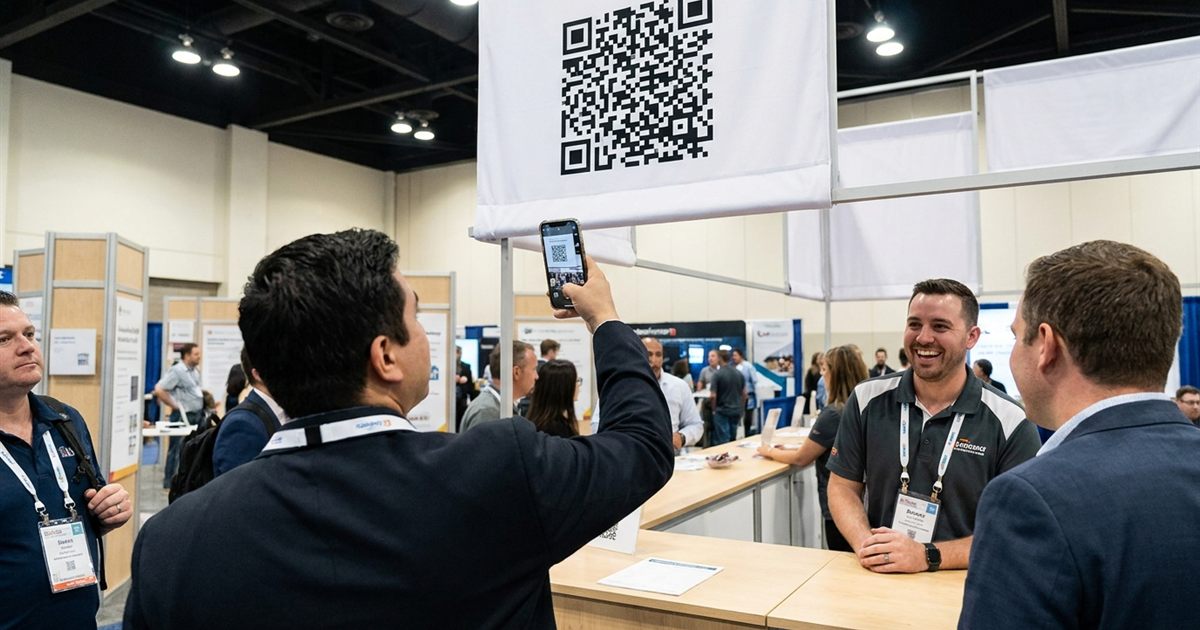
A trade show booth has seconds to make a first impression and a crowd to compete with. A QR code can turn a casual glance into a contact, a download or a booked demo, but only if it is big enough to scan from the aisle, links to something useful and works on a crowded hall network. Many booths print a single code on a table tent and hope. This guide covers how to plan QR codes for the banner, the table and the badge, what each should link to and how to avoid the problems that show up on show day.
Generate the QR codes for your booth, banner and badges in minutes
Create Your Booth QR CodeDecide What Each Code Is For
One code rarely suits every surface. Think in three jobs:
- Banner or backdrop: draws people in from a distance to one clear offer.
- Table or counter: converts visitors who are already at your booth.
- Badge or handout: lets people save your contact after the conversation.
Give each one its own destination so you can see which actually worked.
Size for Distance
A useful rule of thumb is that a QR code scans reliably at about ten times its width. A code 5 cm wide scans from about 50 cm, which suits a table. A banner code meant to scan from 3 meters needs to be at least about 30 cm wide. Always allow a margin, since people hold phones at awkward angles and walk past.
More detail on size and distance appears in QR codes for banners and signs and showing a QR code on a slide or screen.
What to Link To
Your link decides whether a scan turns into a lead:
- A simple landing page: one headline, one benefit, one action.
- A downloadable guide or brochure: see QR codes for lead magnets and PDFs.
- A booking page for a demo or a meeting.
- A digital business card: see QR code for a vCard.
Remember that attendees are standing in a hall, often with weak signal. Keep destination pages light and fast.
Badges and Lanyards
A badge QR code should be small but solid. Aim for at least about 2.5 cm (1 inch) square, with good contrast and a plain background. A vCard code is often the best choice for a person's badge because the contact details are stored in the code itself, so it works even without an internet connection. Plain text and vCard codes are covered in QR code generator for plain text notes.
Design and Printing Tips
- Use high contrast: dark on light. See QR code color contrast.
- Keep a white border: at least four modules wide, as explained in the quiet zone guide.
- Export vector files: the QR Code Generator gives you SVG for large prints.
- Avoid glare: matte material works better under strong lights than glossy lamination.
- Place at eye level: not on the floor, not above head height.
Add a Reason to Scan
Put a short line beside every code: "Scan for the full price list", "Scan to book a 15 minute demo", "Scan to get the brochure". A code with a reason gets more scans than one without, and your staff can point to it during conversations.
What to Do With the Leads After the Show
A scan is only the start. Leads go cold quickly after a show, so plan the follow up before you leave. A few habits help:
- Capture context. Note what each person asked about, while the conversation is fresh.
- Follow up within two days. Send a short message that refers to what you discussed.
- Use one clear next step. A demo, a call, or a short guide, not a long list of options.
- Review which code performed best. Compare banner, table and badge destinations, and keep the winner for next time.
If you printed separate destinations for each surface, the comparison is easy: look at which pages received visits and which turned into conversations.
Help Your Team Use the Codes Naturally
Staff are part of the system. Give everyone a one sentence invitation they can say out loud, such as "Scan this and you get the full price list on your phone." Point to the code instead of just mentioning it, and keep a printed copy of the destination address at the booth in case someone prefers to type it. A visitor who sees the code, hears the reason and watches a colleague scan it is far more likely to follow.
Show Day Problems to Plan For
- Weak signal in the hall. Large venues often have overloaded networks. Prefer light pages and consider vCard codes that work offline.
- Glare from lights. Strong spotlights reflect off glossy banners. Choose matte material when you can.
- A code placed too low or too high. If people need to crouch or stretch to scan, they will not.
- A damaged print. Carry spares of the small items, such as table cards and badge inserts.
Test on Site, Not Just at the Office
- Print one copy of every code at final size.
- Scan it from the distance your visitors will use.
- Test on two or three different phones.
- Test on mobile data as well as Wi-Fi.
- Bring spare printed copies in case something is damaged in transit.
Static codes cannot be edited once printed, so check the link twice. See static vs dynamic QR codes for the trade-offs.
Frequently Asked Questions
How big should a QR code be on a trade show banner?
A common rule of thumb is that a code scans at about ten times its width, so a code meant to be scanned from 3 meters should be about 30 cm wide.
What should a booth QR code link to?
One clear destination with one action, such as a short landing page, a brochure download or a demo booking page. Keep it light for slow connections.
What is the best QR code for a name badge?
A vCard code works well because the contact details are inside the code, so it can be saved even without internet.
Do I need a different code for each surface?
It is useful. Separate destinations let you see whether the banner, table or badge brings more visitors.
Can I change the link after printing?
Not with a static QR code. Point it to a page you control so you can change the content later.
Ready to turn booth visitors into leads?
Create Your Booth QR Code