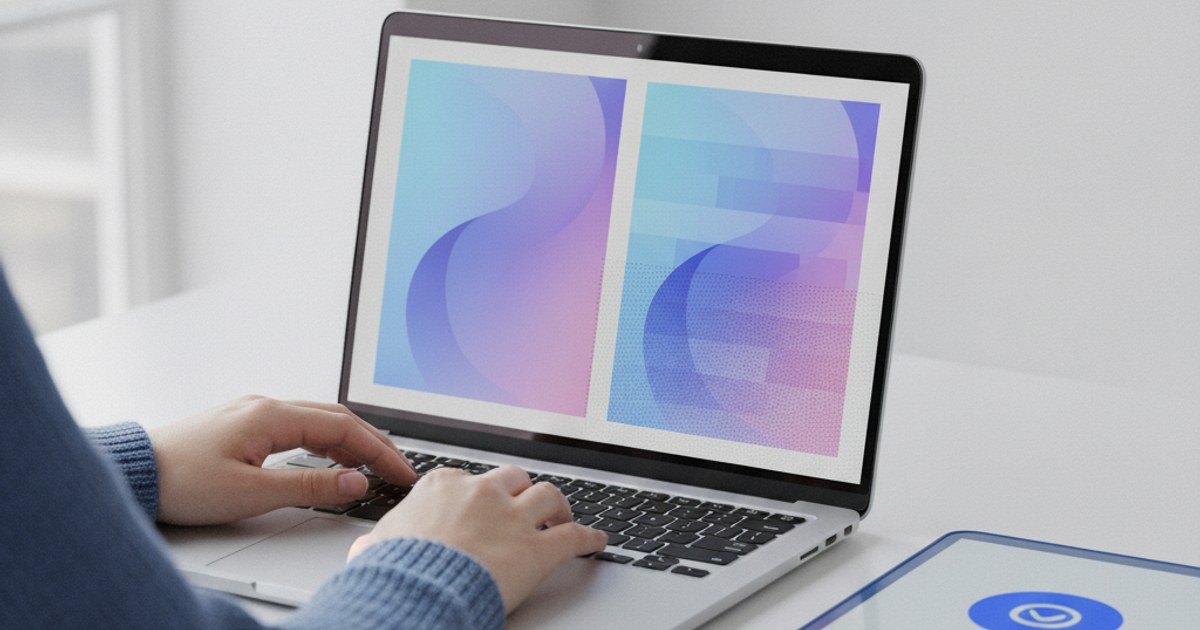
You made a GIF, and instead of the smooth photo or video you started with, it came out looking like it was compressed twice, with visible blotchy patches where a gradient or a sunset used to be smooth. That's not a bug in whatever gif maker you used, it's a real limit built into the GIF format itself, and once you understand it, fixing it takes one setting, not a full re-shoot.
Ready to fix the banding on your GIF?
Open GIF Maker — Free, No SignupWhy Every GIF Is Limited to 256 Colors
The GIF format was created in 1987, long before digital photos regularly needed millions of colors, and it has never been updated to allow more than 256 colors in a single frame. A photo or video frame straight off a phone camera can easily contain tens of thousands of distinct colors, so every animated gif maker has to compress that down to 256 or fewer before it can save a GIF at all. That compression step is where blurriness and banding actually come from, not from anything wrong with your original footage.
What Color Banding Actually Looks Like, and Why
A smooth sky gradient might use a thousand subtly different shades of blue in the original image. Squeezed into 256 total colors for the whole frame, many of those close shades get merged into the same flat color, which is exactly what shows up as a visible line or blotch where the gradient used to fade smoothly. Skin tones, sunsets, and soft shadows are the most common victims, since they rely on tiny color shifts that a limited palette simply can't preserve without help.
Dithering Is the Fix, and It's Usually Just a Setting
Dithering scatters tiny, alternating pixels of two nearby colors next to each other instead of flattening a whole area to one color. From a normal viewing distance, your eye blends those pixels back together and perceives something much closer to the original smooth gradient, even though the frame technically still only uses 256 colors. A good gif maker applies dithering automatically as part of building its color palette, which is the single biggest reason two GIFs made from the same source can look completely different in quality.
See dithering fix your gradients in real time
Open GIF Maker — Free, No SignupA Custom Palette Beats a Generic One Every Time
Some older or simpler tools use one fixed, generic set of 256 colors for every GIF they make, regardless of what's actually in your footage. A better approach scans your specific frames first and builds a custom palette from the colors that actually appear, so a GIF that is mostly blue sky and green grass gets its 256 colors spent on shades of blue and green, instead of wasted on colors that never show up. This two-pass process, scan then build, then redraw, is what separates a crisp export from a muddy one.
When Blur Is Actually a Resolution Problem, Not a Color One
Not every blurry GIF is a color-palette issue. If you shrink the output width down very small, fine details and text can turn soft or illegible regardless of how good the color palette is, since there simply aren't enough pixels left to represent them. If banding is your problem, look at gradients and skin tones. If small text or fine detail looks soft everywhere, try exporting at a slightly larger width instead.
Frequently Asked Questions
Why is GIF still limited to 256 colors in 2026?
The format itself has never changed since 1987, and updating it would break compatibility with every app, browser, and device that already knows how to read a standard GIF. Newer formats like APNG or WebP support more colors, but GIF's universal support is exactly why it's still the default for quick, shareable animations.
Does dithering make the file size bigger?
Slightly, since the scattered pixel pattern is a little less compressible than a large flat area of one color. The difference is usually small compared to the visible quality gain, especially on gradients and skin tones.
Can I fix banding on a GIF I already made, without the source file?
Not fully. Once a frame's colors are flattened during export, that detail is gone from the file itself. Re-running a finished GIF through another tool can't recover colors that were already merged, which is why rebuilding from the original photos or video gives a noticeably better result.
Does a smaller GIF always have worse color quality?
Not necessarily. The 256-color limit applies per frame regardless of pixel dimensions, so a small GIF with good dithering can look better than a large one built with a poor generic palette. Resolution and color quality are two separate settings worth checking separately.
Related GIF tools
- GIF Maker: Build a GIF from images with automatic palette optimization and dithering
- GIF Optimizer: Re-optimize an existing GIF's color and file size